
Screen Time vs Third-Party App Blockers: Which Is Better
By John, ScreenBuddy Founder
Screen Time is free, built into every iPhone, and works well for parental controls and basic tracking. Third-party app blockers cost money but offer stronger enforcement, better self-control features, and harder-to-bypass restrictions. The right choice depends on who you're trying to limit and how easily you bypass your own rules.
KEY TAKEAWAYS
Screen Time is best for parental controls and basic usage tracking
Third-party blockers are better for adult self-control
Friction-based blockers (ScreenBuddy, One Sec, Opal) add a pause before apps open
Hard blockers (Freedom, Cold Turkey) lock you out completely during set times
Start with Screen Time; upgrade when you keep bypassing your own limits
How Screen Time Works
Screen Time is Apple's built-in tool for monitoring and limiting phone usage. You can:
Track usage: See how much time you spend on each app
Set app limits: Cap daily usage for specific apps or categories
Schedule Downtime: Block all apps except those you allow during certain hours
Restrict content: Filter explicit content, block purchases, limit who can be contacted
The main limitation: enforcement is weak. When you hit a limit, Screen Time shows an "Ignore Limit" button. If you set a passcode, you know it. If you're managing yourself, bypassing is always one tap away.
Screen Time was designed for parents managing children's devices through Family Sharing. When the parent controls the passcode, the system works. When you control your own passcode, willpower is your only enforcement.
How Third-Party Blockers Work
Third-party app blockers fall into two main categories: friction-based and hard blockers.
Friction-based blockers don't prevent you from opening apps. They add a pause. When you tap Instagram, you get a countdown (10-30 seconds) before the app opens. This breaks the autopilot habit and forces you to decide if you actually want to scroll.
Apps like ScreenBuddy, One Sec, and Opal use this approach. ScreenBuddy adds a 25-second pause plus a 45-minute daily "pause budget." You can still access apps, but you have to spend your limited time intentionally.
Hard blockers completely prevent access during scheduled times. Apps like Freedom and Cold Turkey let you set blocking schedules that are difficult or impossible to override once activated. During blocked periods, the apps simply won't open.
Side-by-Side Comparison
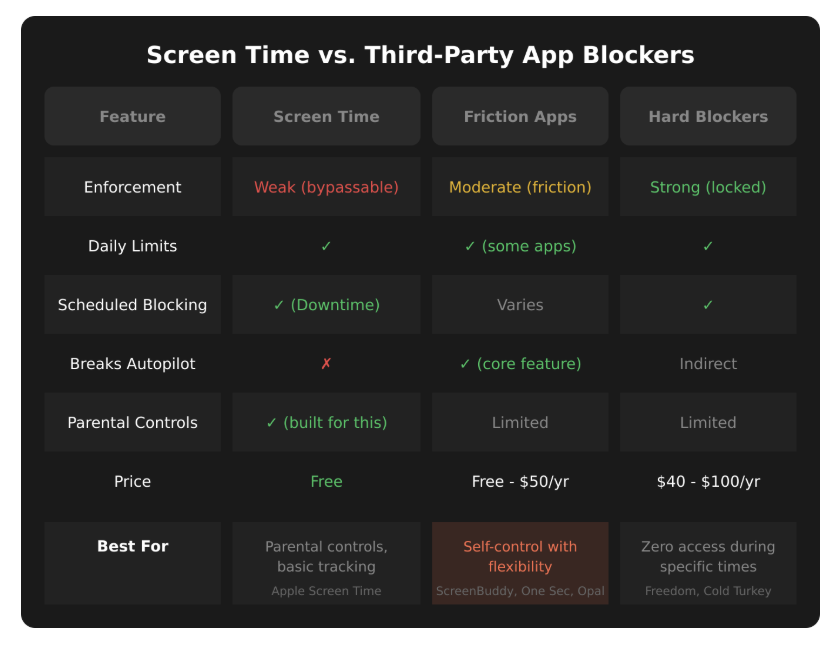
Comparison table showing Screen Time vs friction apps vs hard blockers across six features: enforcement level, daily limits, scheduled blocking, breaks autopilot, parental controls, and price. Friction apps column highlighted as best for self-control with flexibility.
When to Use Screen Time
You're limiting a child's device. Screen Time's parental control features are solid. Use Family Sharing so you control the passcode remotely.
You just want to track usage. Screen Time's reports show exactly where your time goes. Awareness alone helps some people cut back.
You're starting out. It's free and already on your phone. See if gentle limits work before paying for something stronger.
You rarely bypass your own limits. If "Ignore Limit" doesn't tempt you, Screen Time might be enough.
When to Use a Third-Party Blocker
You keep tapping "Ignore Limit." If you override Screen Time daily, you need something without an easy bypass.
You want to break the autopilot. Friction-based blockers interrupt the unconscious habit of opening apps without thinking.
You need zero access during certain times. Hard blockers remove the option to "just check real quick" during work or sleep.
You've tried Screen Time and failed. This was me. I used Screen Time for months, bypassed it constantly, and only saw real change when I switched to a friction-based approach.
What I Learned From Switching
I tried Screen Time first. I set limits on Instagram, then Twitter, then Reddit, then YouTube, then Snapchat. At first I'd tap "Remind Me in 15 Minutes." Eventually I just went straight to "Ignore Limit for Today." I did this daily for months.
I even tried creating custom schedules that only allowed social media the first fifteen minutes of each hour. I ended up spending every first fifteen minutes maximizing my scrolling. The limit existed but my behavior adapted around it.
When I switched to a friction-based blocker, the dynamic changed. Instead of a limit I could ignore, I had a pause I had to sit through. The 25-second countdown doesn't sound like much, but it's long enough to break the autopilot. I started asking myself if I actually wanted to scroll or if I was just reaching out of habit.
I went from 7 hours of daily screen time to under 3 hours. The friction wasn't aggressive enough to make me rage-quit, but it was consistent enough to change my behavior over time.
Which Should You Choose?
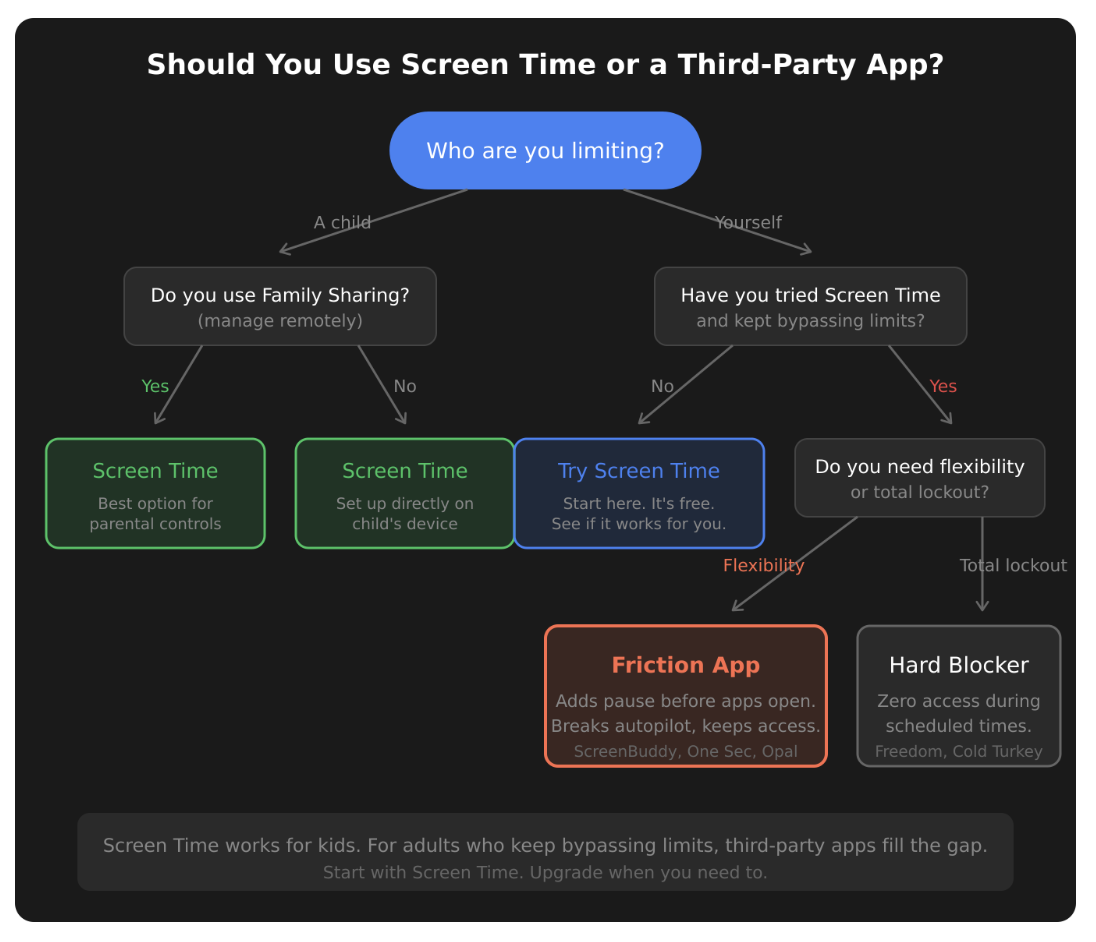
Flowchart helping readers choose between Screen Time and third-party apps. Starts with "Who are you limiting?" and branches into child (recommends Screen Time) or yourself (asks if you've bypassed limits before, then recommends friction apps or hard blockers based on flexibility needs).
Start with Screen Time. It's free and might be enough.
If you keep bypassing it, try a friction-based blocker like ScreenBuddy, One Sec, or Opal. Friction adds accountability without being so strict you disable it.
If friction isn't enough, try a hard blocker like Freedom or Cold Turkey. Scheduled lockouts remove the choice entirely.
For kids, Screen Time with Family Sharing is the right tool. You control the passcode, so the bypasses don't apply.
Bottom Line
Screen Time is a starting point, not a solution. It works well for parental controls and for people who don't need strong enforcement. For adults trying to limit themselves, third-party blockers close the gaps Screen Time leaves open. Start free, and upgrade when you need to. For a complete walkthrough of Screen Time's features, see our iPhone Screen Time guide.
